
Why project organization matters
Creating or editing images with AI is often fast, but the work around each image can become messy if files, prompts, and versions are not organized. A clear project structure helps users save time, avoid confusion, and get more consistent results. This is useful for many kinds of work, including blog graphics, product images, marketing visuals, profile pictures, and creative concepts. When every image project has a simple system, it becomes easier to track what was uploaded, what prompt was used, what edits were made, and which final image should be published. Good organization also supports better teamwork because other people can review files and understand the process without guessing. Even for individual users, a repeatable method reduces mistakes such as uploading the wrong source image, overwriting a finished version, or losing a strong prompt that produced a useful result. For a website focused on AI image generation and editing, project organization is an important topic because it helps users get more value from the tools they already use and makes daily image work more efficient.
How to build a simple workflow
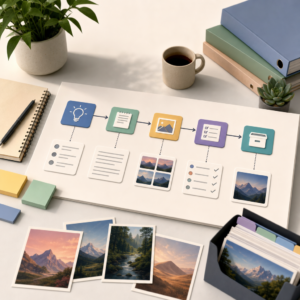
A practical way to organize an AI image project is to divide it into a few clear stages: planning, source collection, generation or editing, review, and export. In the planning stage, define the goal of the image before starting. This may include the subject, style, size, audience, and platform where the image will be used. Next, keep all source materials together in one folder, including original photos, brand references, inspiration images, and text notes. During generation or editing, save prompt variations in a document so successful ideas can be reused later. It also helps to use file names that describe the content and version, such as product-banner-v1, product-banner-v2, and final-approved. For review, compare several outputs side by side and note what works best in terms of composition, clarity, color, and accuracy. After choosing the strongest result, export the final file in the right format and resolution for its intended use. This type of workflow is simple, but it creates a reliable process that supports both quick tasks and larger image projects.
Tips for keeping projects consistent over time
Consistency becomes more important as users create more AI images for the same brand, campaign, or content series. One of the most effective habits is to keep a prompt library with examples that produced strong results. This library can include visual style notes, camera angle ideas, lighting descriptions, color preferences, and negative prompt examples when relevant. Another useful step is to create folders for drafts, approved images, and exports so unfinished work does not get mixed with final assets. Users can also maintain a short checklist before publishing, such as confirming image dimensions, checking for visual errors, reviewing text accuracy inside the image, and making sure the final result matches the original goal. If a project requires multiple related images, recording the settings and wording used across versions can help maintain a unified look. Organized projects are easier to update later, whether the goal is to resize an image, refresh a campaign visual, or create matching assets from an earlier concept. A structured approach turns AI image creation from a one-off task into a repeatable process that supports better quality and faster results.


